


Update 26.3: Less rework, more time for your craft
Every switch between two views takes time, and every overlooked error costs money on the construction site. SEMA 26.3 addresses this very issue: You can edit components directly in their installation position and detect collisions right in the model.
Exclusive to the new licensing model
Direct editing
Edit wherever you look
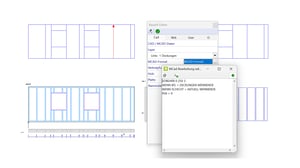
You’re working on a connection in the offset view and have to switch back to the original position for every change. Starting with Update 26.3, you can stay in the view you’re working in: You can modify layers, panels, lumber, dimensions, and MCAD edits right there. SEMA correctly transfers every change to the actual component position.
- No more switching between two views
- The installation position remains visible during editing
- Fewer errors because you make changes directly in context
- Existing projects remain fully compatible
Even in the old licensing model
Silhouette for 3D objects
Clean drawings instead of a triangular mesh
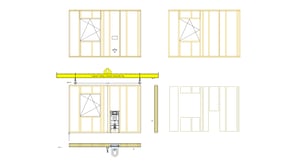
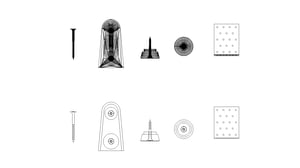
You import 3D objects—such as fasteners—from the manufacturer, and a dense mesh of triangular edges appears in the drawing. Starting March 26, SEMA will display these objects in 2D and in section with their actual outer contours. Your drawings remain legible, and performance improves because less rendering is required.
- Fewer drawn edges: Views load faster
- Smaller drawing and PDF files for distribution and archiving
- Use manufacturer objects at full detail level
- Can be toggled in the display settings (F7)
Exclusive to the new licensing model
Precise collision detection
Detect design errors in the model—not just during alignment
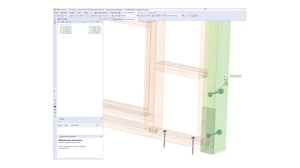
A steel beam is missing holes for fastening the wooden trusses—and this isn’t noticed until the alignment phase. Starting March 26, the collision check in the Control Center will also verify steel components and machining operations based on the exact geometry.
- Checking steel/steel, steel/wood, wood/wood, as well as machining operations on wood and steel
- Errors are detected in the model before they cause rework, downtime, or schedule delays
- Scope of checks can be configured separately for components and machining operations
- Hits in the Control Center: SEMA highlights the component; the collision can be addressed and resolved with a right-click.
Even under the old licensing model
Live presentation
Showcase projects from every angle
Previously, the calculation would stop as soon as you rotated the model. Now, the photorealistic view immediately displays an initial image, continuously refining itself—and you can freely rotate the model even while it’s rendering. This lets you show the client their project from every perspective, right in SEMA.
Also in the old licensing model
Flexible layer structures
Move references instead of rebuilding
If a layer structure changes, simply right-click the reference and move it to the new layer number. Material, finish type, layer nailing, and finishes are automatically updated—for walls, ceilings, and roofs, as well as for 3D objects and electrical combinations. There’s no need to delete and reassign references.
Exclusive to the new licensing model
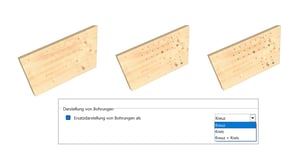
Hole symbols of your choice
See hole diameters at a glance
In addition to the familiar cross symbol, you can now also choose a circle or a circle with a cross as the display option (Alt+F7). This makes the hole diameter immediately visible. Even parts with many holes remain clearly organized, and navigation within the model remains smooth.
Exclusive to the new licensing model
Customizable roof pitch directly in 3D
From scan to design-ready roof
Roof surfaces created from a point cloud often have irregular slopes. You can now enter the slope directly in 3D or derive it from point elevations—and continue working with industry-standard values. The preview shows every change immediately.
Exclusive to the new licensing model
Floor identification
Each wall is uniquely identified on the machine
When exporting to Wallmaster, you can now also transfer floor, construction project, and other details using SEMA placeholders or free text. In Cambium, you can sort and filter your wall nestings accordingly. This allows you to reliably assign walls from different floors in Hundegger Cambium. Mix-ups are now a thing of the past.
Exclusive to the new licensing model
Production Approval
Produce or just display: You decide in SEMA
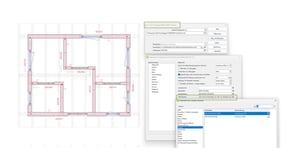
You can specify as early as the design phase whether text or contours are to be displayed or actually produced on the machine. This eliminates the need for manual adjustments at the machine.
Exclusive to the new licensing model
Automatic Sealing Tape Application
Adhesive and sealing tape application directly from the machine
With the BTLx-2.4 Export (Beta), the machine applies adhesive and sealing tape on its own: to joints, seams, and transitions, precisely following your MCAD contour. This eliminates one manual step per wall layer.
Exclusive to the new licensing model
Flashing as sheet processing
Faster production without rework
SEMA now exports square chamfers as a separate sheet-processing operation. This eliminates the need for chiseling and re-milling, reducing machine runtime. The corners come out of the machine without any rounding.